What kinds of files can I build?
Any creative or interactive file, as powerful as you want to make it: a tool, a tracker, a whole product.
Interface, behavior, content, and current state, all in one HTML file.
Why put a whole app in one file?
So your effort goes into the software experience, not into holding up the stack around it.
A full-stack app makes you push the same boulders up the same hills every time you want one small change.
trial slot, per your form comment: does sisyphus-boulders land here, or should it move to the pricing page?
How do I edit my files?
Flip an app into edit mode and the editing controls appear only for you. Visitors always see a clean, static page.
Edit in place: headings, text, inputs, and drag-to-reorder lists, all driven by plain HTML attributes.
Or open the built-in code editor and change the source directly. You can even edit the DOM in your browser's DevTools, hit save, and it persists.
Every save is live for every visitor immediately. No build, no deploy. Auto-save can catch what you'd forget to keep.
Upload images and files, organize everything in a desktop-style dashboard, and reference uploads straight from your apps.
Who can see it, who can edit it?
Every app gets its own URL at yourname.hyperclay.com, or on your own custom domain with automatic SSL.
Flip an app to private and it exists only for you.
Generate a secret share link (or QR code) that lets someone open and edit the app without an account. Revoke it anytime.
Opt an app into the public Discover gallery to let others find and fork it. Off by default.
Can we edit it together?
People editing the same app see each other's changes appear instantly, no refresh.
Incoming changes merge into the live page element by element, so your cursor, your inputs, and running animations survive every update.
Share edit access with a link; collaborators don't need accounts.
What if I break something?
Every save files a backup. Browse the history and restore any version with one click.
Restoring is itself safe: it snapshots your current state first, so you never lose anything.
And undo and redo step through your edits in the browser, restoring the exact elements rather than re-rendering the page.
How do I edit my files locally?
Hyperclay Local is a free desktop app for Mac, Windows, and Linux: a one-click local server that runs your malleable HTML files entirely offline, version history included.
Connect it to your account and a folder on your computer syncs both ways with the cloud. Edit a file locally and it publishes; changes on the web come down to your disk.
Sync is conflict-safe, with on-disk backups before any overwrite.
How do I distribute malleable HTML files?
htmlclay makes self-saving files a native document format: double-click a .htmlclay file to open, edit, and save it back to itself, completely offline, no account.
Email it, drop it in Dropbox, commit it to git. It's just a file.
How do I make a static HTML file editable?
A visual CMS, part of ClayJS
Open the CMS panel and it generates an editing form from your page's content. Type in the form and the page updates live.
Text, numbers, toggles, dropdowns, tag chips, repeatable card lists, and image uploads with built-in cropping.
Or let AI do the wiring: one click sends your page to a model that rewrites it to be CMS-editable for you.
the approved section order leaves multi-tenant apps (turn on signups, every user gets their own copy) off this page entirely. Add a section for it?
What have people built with it?
Each of these is one malleable HTML file.
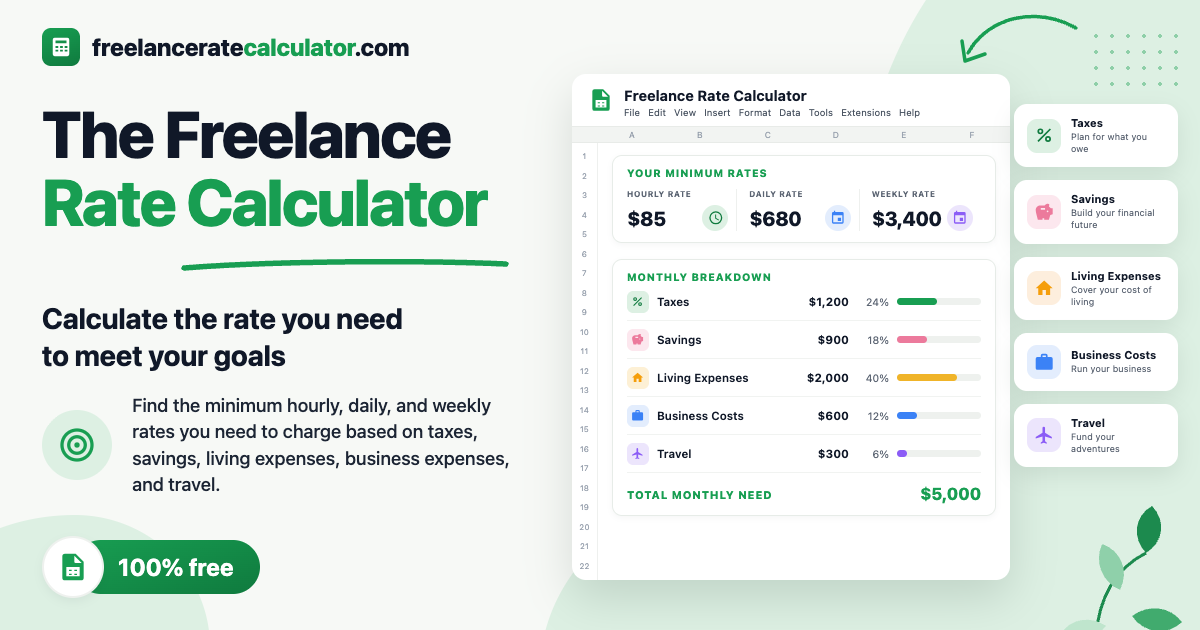 Freelance Rate Calculator — freelanceratecalculator.com